skeleton
SCM-Managed Approach
It’s intended to be used by a new or existing project to adopt these practices and honed and proven techniques. Adopters are encouraged to use the project directly and maintain a small deviation from the technique, make their own fork for more substantial changes unique to their environment or preferences, simply adopt the skeleton once and abandon it thereafter, or use it as a reference from which to cherry-pick ideas.
The primary advantage to using an SCM for maintaining these techniques is that those tools help facilitate the merge between the template and its adopting projects.
Another advantage to using an SCM-managed approach is that tools like GitHub recognize that a change in the skeleton is the same change across all projects that merge with that skeleton. Without the ancestry, with a traditional copy/paste approach, a commit like this would produce notifications in the upstream project issue for each and every application, but because it’s centralized, GitHub provides just the one notification when the change (and its commit hash) is added to the skeleton.
Yet another advantage is the ability to manage common concerns in a common repo. Concerns that apply to the best practices or other concerns managed by skeleton can be filed, tracked, and resolved in the skeleton issue tracker.
Usage
new projects
To use skeleton for a new project, simply pull the skeleton into a new project:
$ git init my-new-project
$ cd my-new-project
$ git pull gh://jaraco/skeleton
Now customize the project to suit your individual project needs.
In particular, make some replacements:
PROJECT: name of the project in PYPIPROJECT_PATH: org/name of the project in GithubPROJECT_DESCRIPTION: a description of the projectPROJECT_RTD: (optional) the RTD-mangled name of the project
existing projects
If starting from an existing project, incorporate the skeleton by merging it into the codebase.
$ git merge skeleton --allow-unrelated-histories
The --allow-unrelated-histories is necessary on the first merge because the history from the skeleton was previously unrelated to the existing codebase. Resolve any merge conflicts and commit to the master, and thereafter the project is based on the shared skeleton.
Updating
Whenever a change is needed or desired for the general technique for packaging, it can be made in the skeleton project and then merged into each of the derived projects as needed, recommended before each release. As a result, features and best practices for packaging are centrally maintained and readily trickle into a whole suite of packages. This technique lowers the amount of tedious work necessary to create or maintain a project, and coupled with other techniques like continuous integration and deployment, lowers the cost of creating and maintaining refined Python projects to just a few, familiar Git operations.
For example, here’s a session of the path project pulling non-conflicting changes from the skeleton:

Additionally, the author maintains a routine to mechanically apply the changes from the skeleton or other “upstream” bases.
Thereafter, the target project can make whatever customizations it deems relevant to the scaffolding. The project may even at some point decide that the divergence is too great to merit renewed merging with the original skeleton. This approach applies maximal guidance while creating minimal constraints.
Periodic Collapse
In late 2020, this project introduced the idea of a periodic but infrequent (O(years)) collapse of commits to limit the number of commits a new consumer will need to accept to adopt the skeleton.
The full history of commits is collapsed into a single commit and that commit becomes the new mainline head.
When one of these collapse operations happens, any project that previously pulled from the skeleton will no longer have a related history with that new main branch. For those projects, the skeleton provides a “handoff” branch that reconciles the two branches. Any project that has previously merged with the skeleton but now gets an error “fatal: refusing to merge unrelated histories” should instead use the handoff branch once to incorporate the new main branch.
$ git pull https://github.com/jaraco/skeleton 2020-handoff
This handoff needs to be pulled just once and thereafter the project can pull from the main head.
Here’s what the tree looks like following a handoff:
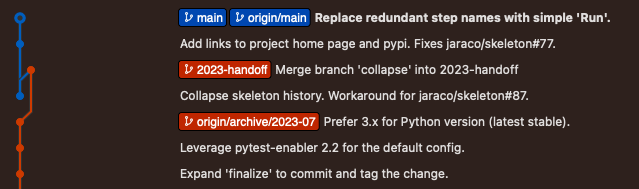
The update-projects routine may be used to apply this project to existing projects:
py -m jaraco.develop.update-projects --branch 2023-handoff
The archive and handoff branches from prior collapses are indicate here:
| refresh | archive | handoff |
|---|---|---|
| 2020-12 | archive/2020-12 | 2020-handoff |
| 2023-07 | archive/2023-07 | 2023-handoff |